 By Graham Fisher
Choosing between a hard-shell electronics case and a padded soft case for travel starts with one simple question: what is inside, and how hard can it be bumped? Hard cases use a rigid exterior with foam or elastic inserts to protect fragile gear from crushing and drops. Soft cases use lighter fabric and padding to organize everyday accessories without adding bulk.
The short answer
Use a hard case for items that cannot absorb impact: camera gear, small drones, external drives, and fragile recording or medical equipment. Use a padded soft case for chargers, cables, adapters, earbuds, and other items that are more inconvenient to lose than to break. Many travelers end up carrying one of each, with the hard case packed against the frame of a backpack and the soft case tucked into a side pocket.
How each option works
Hard-shell cases
Hard-shell cases are molded from rigid materials such as polycarbonate, ABS plastic, or aluminum. The shell holds a fixed shape, so the case creates its own protected space inside your bag. Inside, a foam insert, elastic strap, or fitted divider keeps each item from shifting. When the bag is dropped or squeezed, the shell absorbs the impact and keeps the contents away from the pressure point.
The fixed shape is the main trade-off. A hard case that is half full still takes the same amount of space, and it needs a pocket or compartment large enough to accept its exterior dimensions. That makes hard cases less flexible for bags with tapered corners or unusual internal layouts.
Padded soft cases
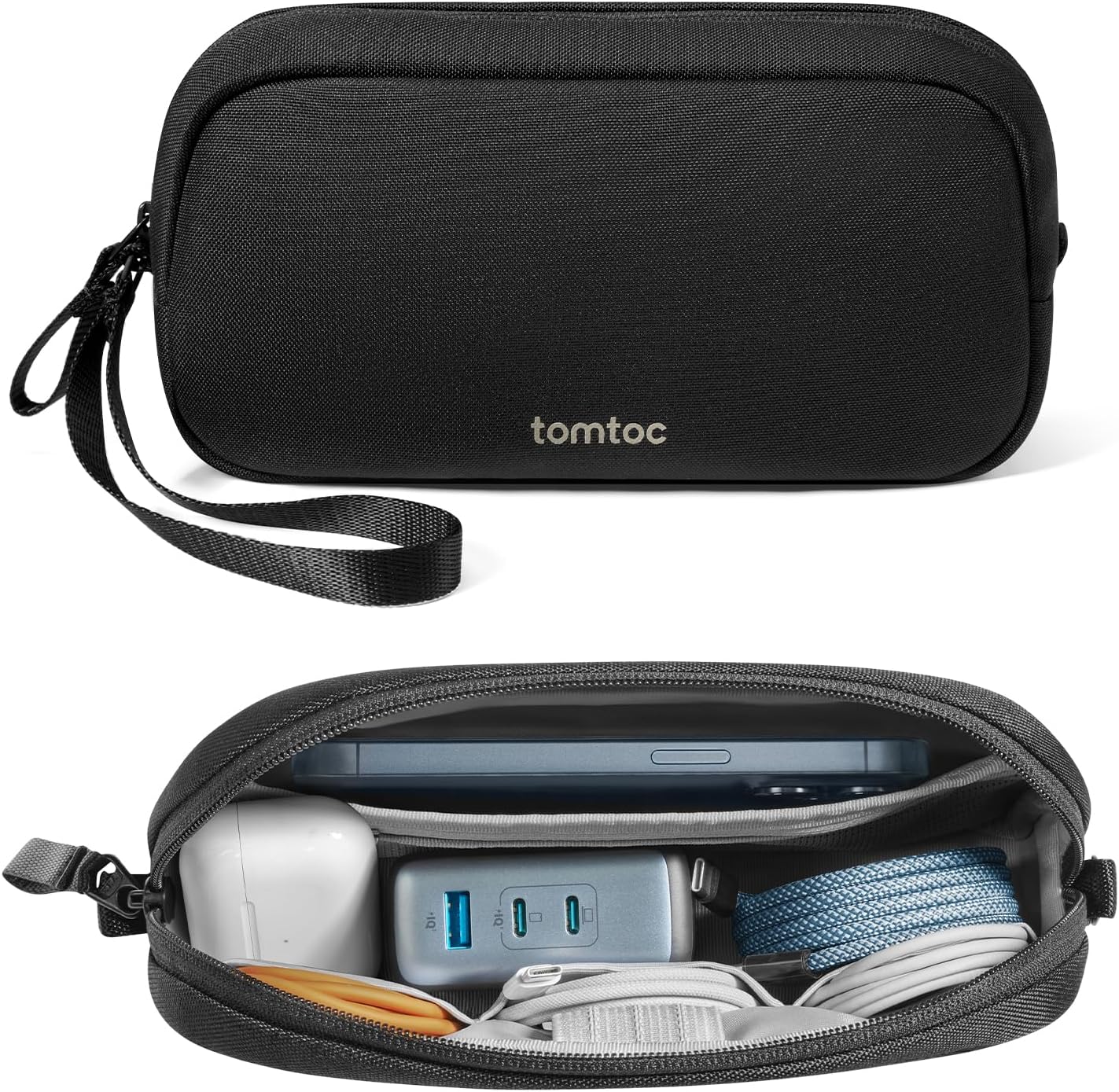
Soft cases are built from woven nylon or polyester with a layer of padding between the outer fabric and the inner liner. They are lighter than hard cases of similar capacity, and because the padding flexes, the case can compress, bend, and settle into the gaps between other items in your bag.
The real advantage of soft cases is organization. Interior layouts usually include multiple zippered compartments, mesh pockets, hook-and-loop dividers, and elastic loops for cables. That makes a soft case a better everyday home for the small items you reach for often. The trade-off is lower crush protection: soft fabric and foam will not stop a heavy object from pressing down on your gear.
Side-by-side comparison table
| Consideration | Hard-shell case | Padded soft case |
|---|---|---|
| Crush protection | Rigid shell absorbs impact and resists pressure | Light foam padding, limited crush resistance |
| Shape | Fixed and predictable in your bag | Flexible, conforms to available space |
| Weight | Heavier for the same interior space | Generally lighter to carry |
| Interior organization | Foam or elastic inserts hold items in place | Multiple pockets, mesh slots, cable loops |
| Water resistance | Depends on the case; some have sealed gaskets | Water-repellent fabrics, not immersion-proof |
| Best for | Cameras, drives, fragile electronics | Chargers, cables, earbuds, adapters |
| Packing style | Needs a regular-shaped pocket | Slips into odd gaps and full sections |
When a hard case is the better choice
Protecting drives and storage devices
An external hard drive or solid-state drive is small enough to slide into any pocket but fragile enough to fail if it takes a sharp drop. A hard case with a foam cradle or elastic strap holds the drive in position so the connector and housing are not stressed. If you travel with a backup drive, the extra weight of a hard shell is usually a fair price for protecting the only copy of your work or photos.
Camera gear and delicate electronics
Camera bodies, lenses, a small drone, field recorders, and handheld stabilizers all have moving parts or exposed glass. A hard case with form-fitted foam keeps each piece in its own cell and prevents items from knocking against one another. Many camera-ready hard cases are sized to fit inside a larger backpack while still offering a solid outer layer.
When your bag is packed against heavy items
If your electronics case will sit at the bottom of a duffel under a pile of shoes, tools, or food containers, a hard shell matters. A rigid case spreads the load across its surface, and the space inside remains stable even when the bag above it is packed tight. Soft cases cannot provide that kind of crush protection.
For this kind of duty, compare hard electronics cases by their exterior size, latch design, and interior layout before choosing one.
When a soft case is the better choice
Daily carry of chargers and cables
Your everyday electronics kit, such as a wall charger, cables, a small adapter, and earbuds, travels far more often than it gets dropped. A padded soft case with several pockets keeps those items organized and quick to reach. The flexible shell also lets you pack the case around a water bottle or into an end pocket of a backpack. For sorting cables by length and type, the travel cable organizer guide applies the same layout principles to soft cases.
Saving weight and space
If you are trying to keep a bag light, soft cases win. The padding is thinner than a rigid shell, and many models reduce bulk by using stretch mesh and hook-and-loop flaps rather than molded foam. A soft case also shrinks with its contents: an almost-empty case is flat enough to slip behind a laptop sleeve.
Earbuds and small accessories
Earbuds with a charging case fit comfortably in a soft padded pocket, along with audio adapters, a USB stick, or a card reader. Because these items are small, a soft case with a zippered closure is usually sufficient protection. The lighter weight also makes the case less likely to swing around when clipped to a key strap or bag handle.
If you are leaning toward the flexible option, padded electronics organizers come in pocket layouts ranging from a few slots to full multi-section designs. For a closer look at pocket layouts and zipper quality, the tech pouch buying guide walks through how to match a layout to your kit.
Water resistance and weather protection
Hard cases are not automatically waterproof. A rigid shell with a rubber gasket and a sealed latch can protect against rain and brief submersion, but many hard cases have only a basic snap or zipper closure, which keeps out dust and light splashes but not water. Check the manufacturer’s description for an explicit water resistance rating before relying on it.
Soft cases are usually made from water-repellent materials, so they resist light rain and outside moisture, but they are not designed for immersion. The zipper line is the weakest point in most soft cases. In heavy rain or at a waterside dock, place your electronics in a sealed dry bag inside the case, and check the manufacturer’s instructions for both the case and the device.
Carry-on placement and battery rules
Rules for batteries take priority over case type. As general guidance from the FAA and TSA, spare lithium batteries and power banks must travel in carry-on baggage, not checked baggage. This applies whether the battery sits in a padded soft case, a hard-shell case, or a dedicated battery pouch. See the FAA PackSafe page for the current battery guidance, and always check the TSA What Can I Bring page and your airline before travel, because airline rules can be more restrictive.
Carry-on placement should also follow the airline’s size limits for personal items and overhead bags. A hard case inside a carry-on is more predictable because its fixed shape will not bulge; a soft case gives you more freedom when the bag is already full. In either scenario, keep each battery terminal protected and keep power banks from shorting against keys or coins.
Sizing the case to your bag
Before you buy, measure the intended pocket or compartment of your bag, then compare it with the case’s exterior dimensions on the spec sheet. Interior dimensions tell you what the case can hold; exterior dimensions tell you whether it will fit. For a hard case, allow a little clearance on every side because the shell cannot flex. For a soft case, measure the same way but remember that a fully packed case expands, while an under-packed case compresses.
Also think about how you will reach the case during a flight. A case stored in a top-accessible pocket is easier to grab than one buried at the bottom of a backpack. If your bag has a dedicated laptop compartment, a slim padded soft case may slot in beside the laptop, whereas a hard case often needs its own zone.
Match the case to the largest item you carry most often, not the full collection you might pack for a special trip. Buying for the extreme case leaves you with a near-empty shell for everyday travel.
Upkeep and long-term ownership
Hard cases are simple to keep clean: wipe the shell with a damp cloth and rinse foam inserts when they pick up sand or grit. Inspect the latch and hinge occasionally, because a cracked latch is the most common reason a hard case stops protecting. Keep the case out of a very hot car, since heat can warp a molded shell.
Soft cases demand attention at the seams and zippers. Fabric corners wear first, and a zipper that catches on a thread is easier to fix in the moment than to replace later. Wash a soft case only according to the manufacturer’s instructions; many can be spot-cleaned with a soft brush.
Both styles can serve through years of travel if you treat the case as part of your packing system. A hard case protects the gear inside, but it also takes up permanent space. A soft case stays flexible and easier to live with in an already crowded bag.
FAQ
Should I use a hard case or a soft case for a laptop charger?
A padded soft case is usually enough for a wall charger and cables, because the charger is robust and the brick portion resists pressure. If the same accessory travels with a fragile adapter or a spare battery, a small hard case adds protection without taking up much bag space.
Are hard electronics cases waterproof?
Only hard cases with a gasket and a sealed latch are meant for water; most hard cases are water-resistant at best. Soft cases are typically water-repellent, not waterproof. Check the manufacturer’s rating and keep moisture-sensitive electronics in a sealed dry bag when rain is likely.
How should I manage batteries in a carry-on?
As general guidance, spare lithium batteries and power banks must go in carry-on baggage. Keep terminals covered and store the battery so it cannot short against metal. Check the FAA PackSafe page and your airline’s current rules before you fly.
Can a hard case fit in a personal item bag?
Often yes, if the case’s exterior dimensions fit the personal item’s interior space. Because a hard case will not compress, compare the spec sheet with the bag’s dimensions and leave a little clearance. A soft case is more forgiving in a nearly full personal item.
The right electronics case comes down to your gear, your bag, and how the case sits inside your carry-on. Hard shells handle the fragile items and the heavy-pressure zones; soft organizers handle the daily accessories and the tight spaces. Keep the battery rules in mind, match the case to the bag rather than to the catalog, and you will have a system that protects your electronics without weighing you down.
About Graham Fisher
Graham Fisher is part of our editorial team and reviews and edits our backpacks & packing systems guides, checking product details against manufacturer specifications and owner feedback.